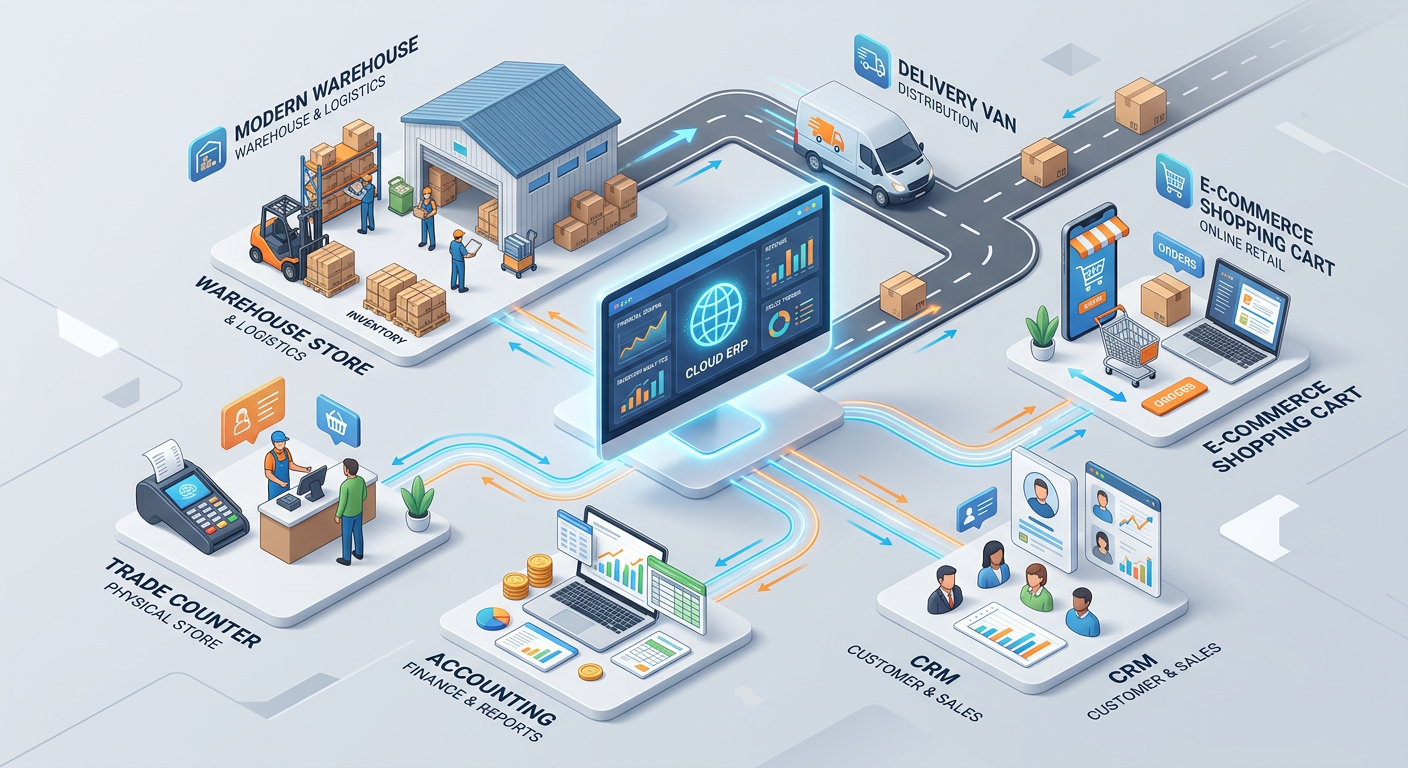
Proactive Customer Acquisition and Retention
Business software, like prof.ITplus, can help you to be more proactive with customer acquisition and retention. Learn how it can help your customer service.

With 50 years' experience in the wholesale and distributor sector, we have put together a 14-page guide on the key facts about ERP. Download yours for free.





A purchase order (PO) is the document a buyer sends to a supplier to confirm what they want to buy, in what quantity and at what price. The purchase order process is everything around it: spotting that you need stock, getting the order approved, placing it with the supplier, checking the delivery and paying the invoice.
Done well, the process keeps stock at the right level, controls spend and leaves a clear audit trail. Done badly, it means missing stock, duplicate orders and supplier invoices that nobody can match.
This guide walks through each step, shows what a purchase order contains, compares a purchase order with an invoice, explains how the buying process connects to order to cash (OTC) on the selling side, and shows how ERP software can automate the whole order management cycle.
The sections below explain each step in detail.
1. Identify the need
Every purchase starts with a need. For a wholesaler or merchant, that is usually stock falling to a reorder level, or a customer order that cannot be filled from what is on the shelf. In other businesses, it may be a request from a department. In a manual process, someone has to notice and tell the buyer. In a connected system, the reorder level or the sales order triggers the request automatically.
2. Raise the purchase order
The buyer creates the purchase order. It should name the supplier, list each product with its code, description, quantity and agreed unit price, and state the delivery address, required delivery date and payment terms. Using the supplier's current price list helps avoid later disputes.
3. Approve the order
Most businesses set approval limits so that larger orders need sign-off from someone senior, and orders outside budget are queried before they are placed. Approval protects cash flow and prevents unauthorised or duplicate purchasing.
4. Send the order and get confirmation
The approved purchase order goes to the supplier by email, EDI or an online portal. Ask for an order acknowledgement. If the supplier changes a price, quantity or delivery date, update the purchase order so there is one agreed record.
5. Receive and check the goods
When the delivery arrives, the goods-in team checks it against the delivery note and the purchase order: right products, right quantities, no damage. A goods received note records what actually arrived, and stock is updated at the same time. Any shortage or damage should be recorded straight away so it can be claimed.
6. Match the invoice
The supplier's invoice arrives, and accounts check it against two other documents: the purchase order (what you agreed to buy) and the goods received note (what you actually received). This is known as three-way matching. It catches price differences, quantities invoiced but never delivered and duplicate invoices before you pay.
7. Approve and pay
Once the three documents agree, the invoice is approved for payment, entered in accounts payable and paid by the due date. The purchase order is then closed. If part of the order is outstanding, it stays open as a back order.
A purchase order should include:
Purchase orders and invoices are often confused because they list the same products and prices. The difference is who sends them, when, and why.
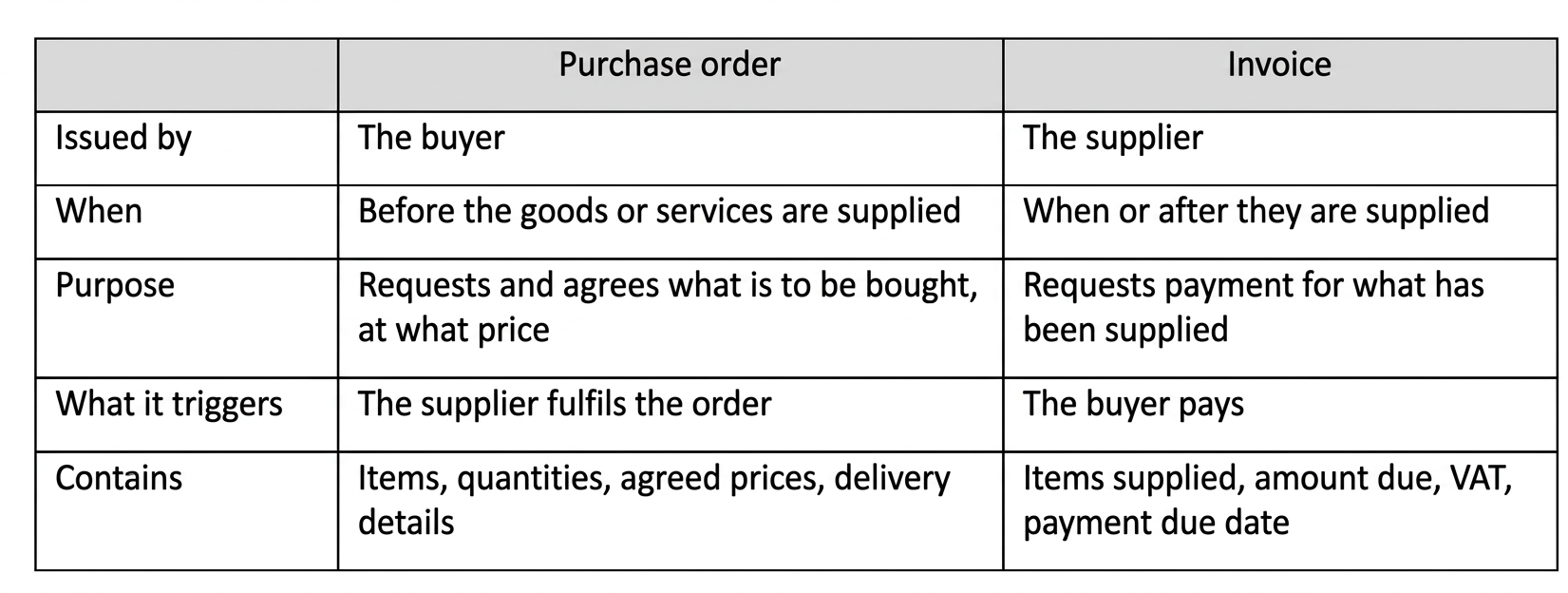
In short, a purchase order says "this is what we want to buy", and an invoice says "this is what you owe us". A purchase order is an offer to buy, and once the supplier accepts it, it usually forms the basis of the contract between you. Check your own terms and conditions for how this applies to your business.
The purchase order process covers the buying side of a business. Order to cash (OTC) covers the selling side: everything from the moment a customer's order is received to the point where payment is received and recorded in your books. For a wholesaler or merchant, the two cycles meet at stock. Purchasing keeps shelves full so that sales orders can be fulfilled, and sales orders drive what you need to buy next.
In spite of its daunting-sounding name, OTC order management is a fairly common place process that takes place in most sales-based businesses. In a digital sales environment, OTC stands for order to cash. Put simply, OTC order management involves the entirety of the order processing system. This covers everything from the moment when the order is received up until the point where payment is made and logged in your books.
In simpler terms, OTC refers to the business processes that involve fulfilling customer requests (such as selling goods or services) in exchange for money. So, what are these processes exactly? Let's have a look.
As outlined above, the order to cash cycle starts when an order is received and ends when the money is recorded in the general ledger. As it turns out, a lot of things happen between these two points. Scroll down as we go through all the different processes in OTC order management.
1. Order placement
This is where the entire cycle begins. It sounds simple enough, but this step can actually bring serious headaches to a business. An inefficient OTC order management system will inevitably result in delays in order submission and sending out incorrect items to the customer.
As everyone with an online business knows, amending an error is very expensive. It's better to listen to the old saying - prevention is better than cure. Ensure that your order management systems are solid to avoid getting into trouble.
2. Order fulfilment
At this point, you've successfully received the order and sent out an order confirmation email to your customer - well done! Now it's time to inform your warehouse and distribution teams about the order so they can pick it and pack it. Easy, right? Well, only on paper. The truth is that liaising with your distribution team to ensure the smooth running of operations can be tricky.
That's why we recommend having a solid order management system (OMS) in place. A good OMS will put you in the driving seat by providing you with a one-stop solution for all your operations needs. Thanks to this kind of software, your warehouse team will be automatically informed when an order is made - meaning that you'll get your orders out faster and with increased accuracy.
3. Order shipping
Just like picking and packing in the previous step, order shipping can also be automated. When it comes to shipping, the biggest advantage of automation is increased customer satisfaction. As soon as the order is sent out, your customer will receive an email with tracking information. In this day and age, when customers want to be in the loop 24/7, this is an essential service for an online business to provide.
4. Invoice payment and recording
The order to cash cycle doesn't end when the seller receives the money. In fact, the customer will usually make payment at the very beginning of it - that is, when the order is placed. Once this is done, the customer - or the services of their preferred payment option such as PayPal or their bank - will provide you with an invoice. This invoice must be recorded in the general ledger by your accounts team - but first, they need to check that the paid amount is correct.
Once your accounts team green-lights the received invoice, the OTC cycle comes to an end.
Purchase order process FAQs
What is the purchase order process?
The purchase order process is the series of steps a business follows to buy goods or services from a supplier: identifying the need, raising and approving a purchase order, sending it to the supplier, receiving the goods, matching the invoice and paying.
Who approves a purchase order?
That depends on your approval limits. Smaller orders may be approved by a team leader or buyer, larger orders by a manager or director, and orders above set values may need finance sign-off. Approval limits should be written down or managed within an ERP system and applied consistently.
What is three-way matching?
Three-way matching compares three documents before an invoice is paid: the purchase order, the goods received note and the supplier's invoice. If they agree, the invoice is approved. If they do not, the difference is investigated first.
What is the difference between a purchase order and an invoice?
A purchase order is issued by the buyer before supply to request and agree an order. An invoice is issued by the supplier after supply to request payment. The purchase order is the basis for checking the invoice.
What does OTC mean in order management?
In order management, OTC stands for order to cash: the process from receiving a customer's order to receiving and recording payment. It covers selling, whereas the purchase order process covers buying.
Can the purchase order process be automated?
Yes. Purchasing software or an ERP system can prompt reorders, create purchase orders, route them for approval, record goods received and match invoices, which reduces manual work and errors.
Ready to streamline purchasing and order management?
See how Profit4 connects purchasing, stock, sales orders and accounts in one system.